Spot the load.
Book it first.
BoardHawk keeps an eye on your Amazon Relay load board for you. It refreshes quickly, picks out the loads that suit your trucks, and books them with one press, or on its own while you get on with your day.
Chrome or Microsoft Edge on a computer · No card needed · Your Relay password never leaves Relay
showmyplane.com used to put planes on a radar. These days the radar looks for loads instead. Same sky, more useful catch.
Demo data · made-up loads and prices · UK, Europe, US and Canada
Up and running in five minutes
No new website to learn. BoardHawk adds a slim bar to the bottom of your Relay load board and works with the cards you already know.
Download and add it to your browser
Unzip the download, switch on Developer mode in Chrome or Edge and load the folder. Our install guide shows every click.
Start your free trial
Open the Relay load board. The BoardHawk box asks for your name and e-mail – that's it. Seven days, up to three browsers, no card.
Set your filters, press START
Tell it which sites you never want, how much notice you need, which sounds to play. Then press START and get on with your day.
Everything happens on Relay's own board
BoardHawk doesn't draw a second board over the top. It marks Relay's own load cards, moves the good ones to the top and adds a small row of buttons to each card.
Finds the load while you're busy
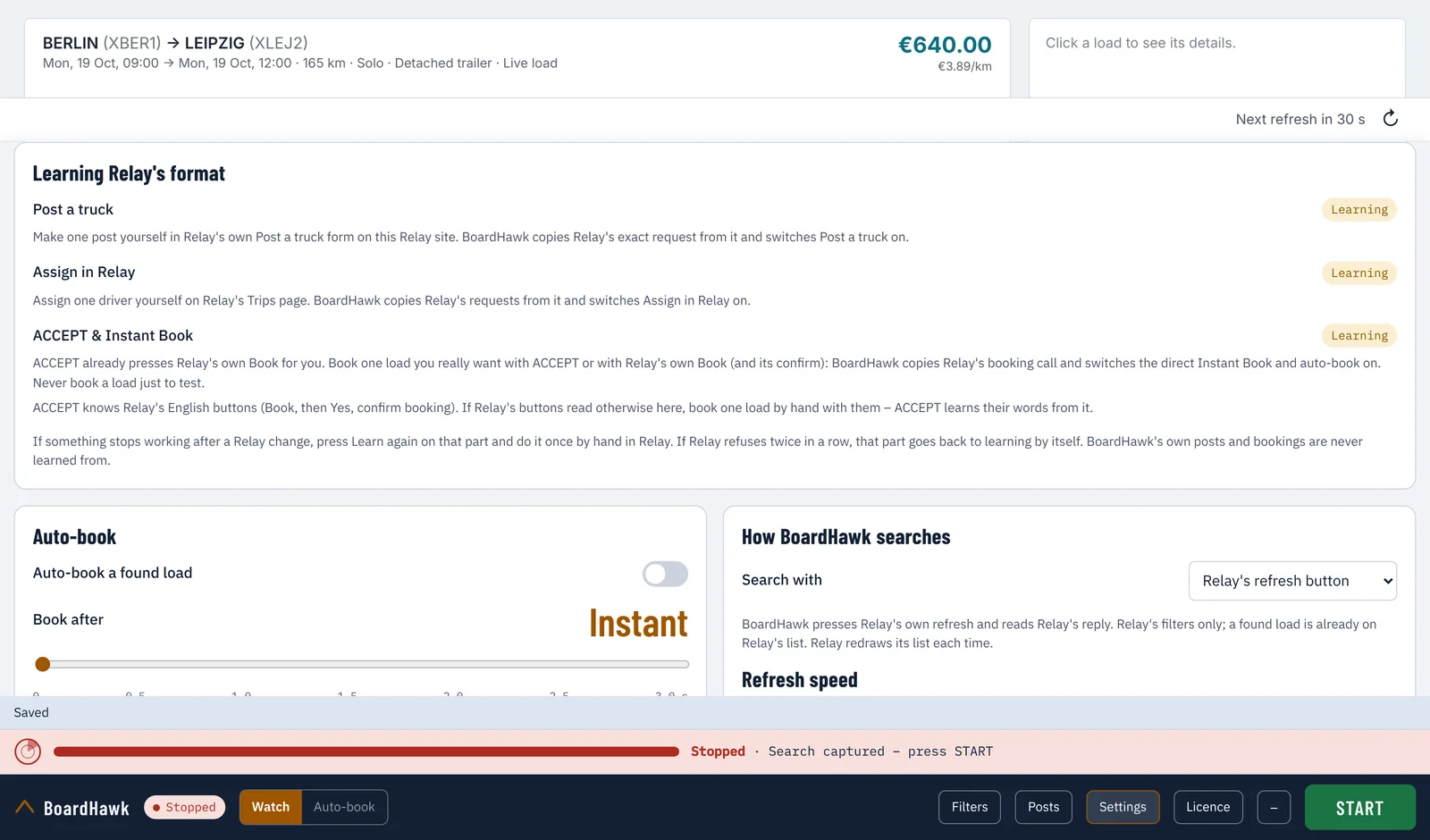
- BoardHawk presses Relay's own refresh for you and reads the loads Relay shows – what you'd do by hand, only steadier.
- It never presses again before Relay has answered and finished showing its list – about 1.6 to 2.1 checks a second by default, never more than 2.1 whatever is set, and a short pause every few minutes.
- If Relay pushes back (a "slow down", a bot check, a sign-in page) BoardHawk slows down or stops straight away and tells you. It never tries to get round a check.
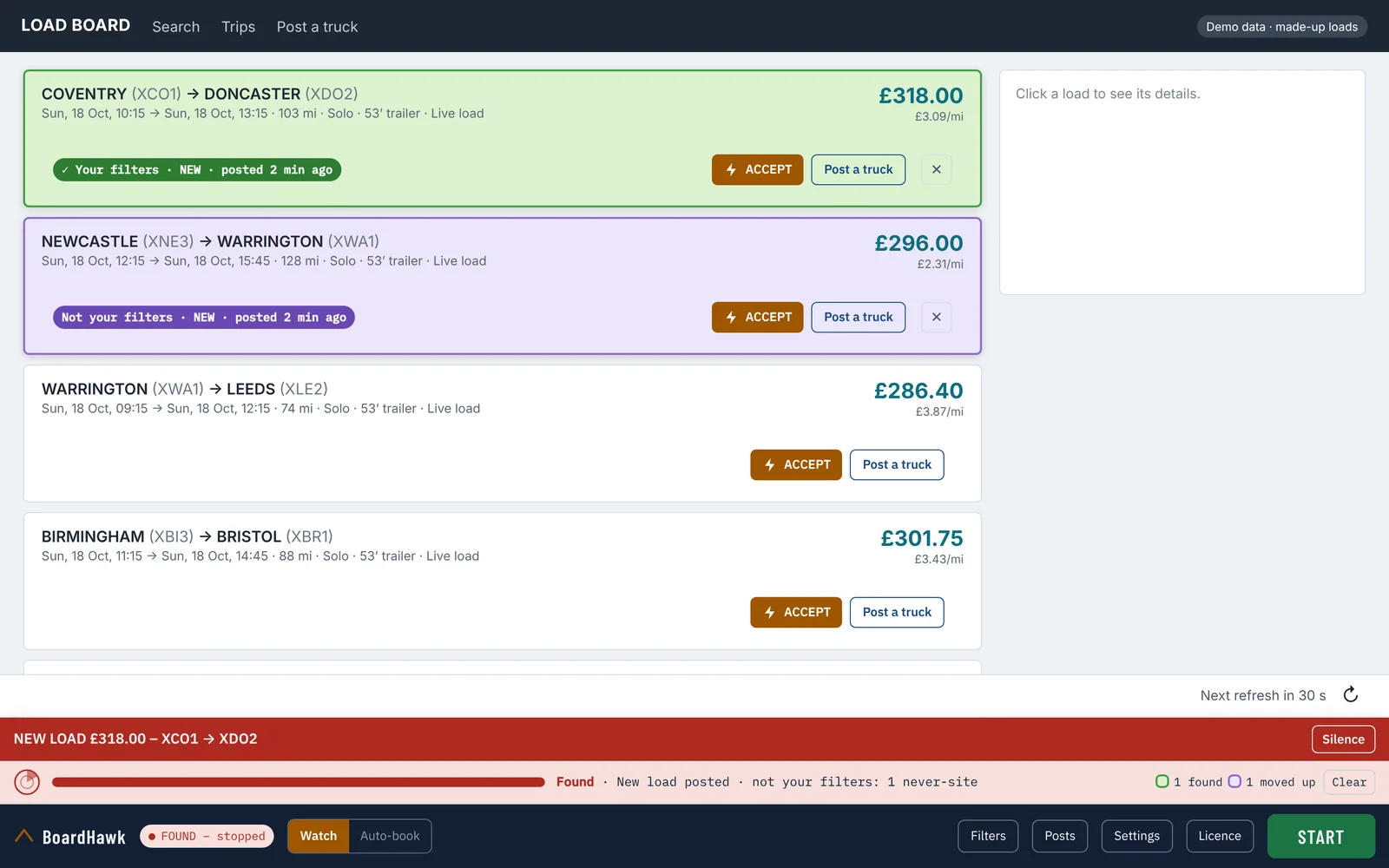
- When a load fits, it stops, rings and shows it at the top: Your filters · NEW or Not your filters · NEW
Filters and sounds that fit how you work
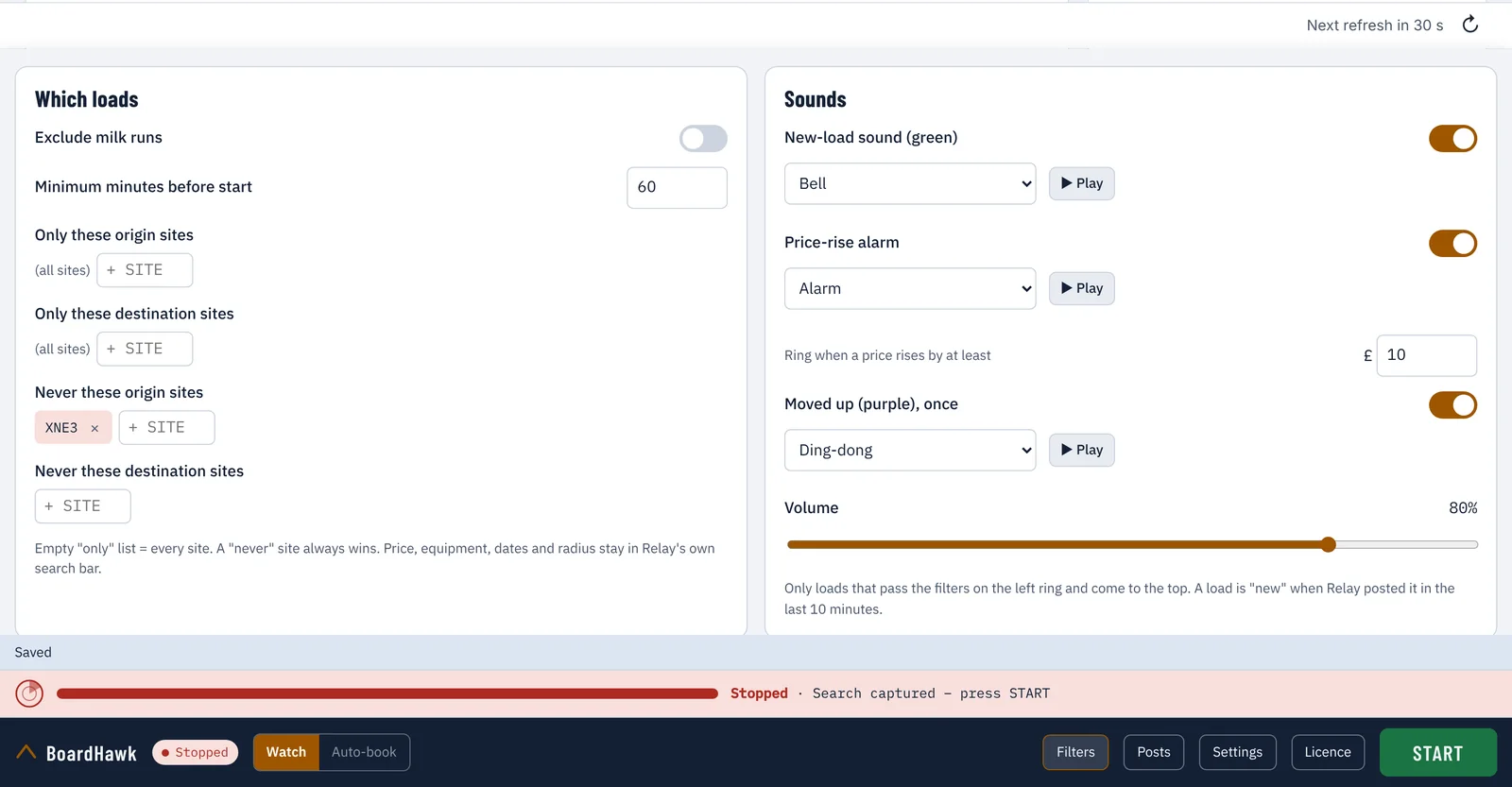
- Leave out milk runs, and loads that start too soon for you to cover.
- Only these sites, or never these sites – for collection and for delivery. A "never" site always wins.
- A sound for new loads, an alarm when a price rises by more than the amount you set, and a softer one for purple loads. Pick from several sounds and set the volume.
One press to book – or let it book for you
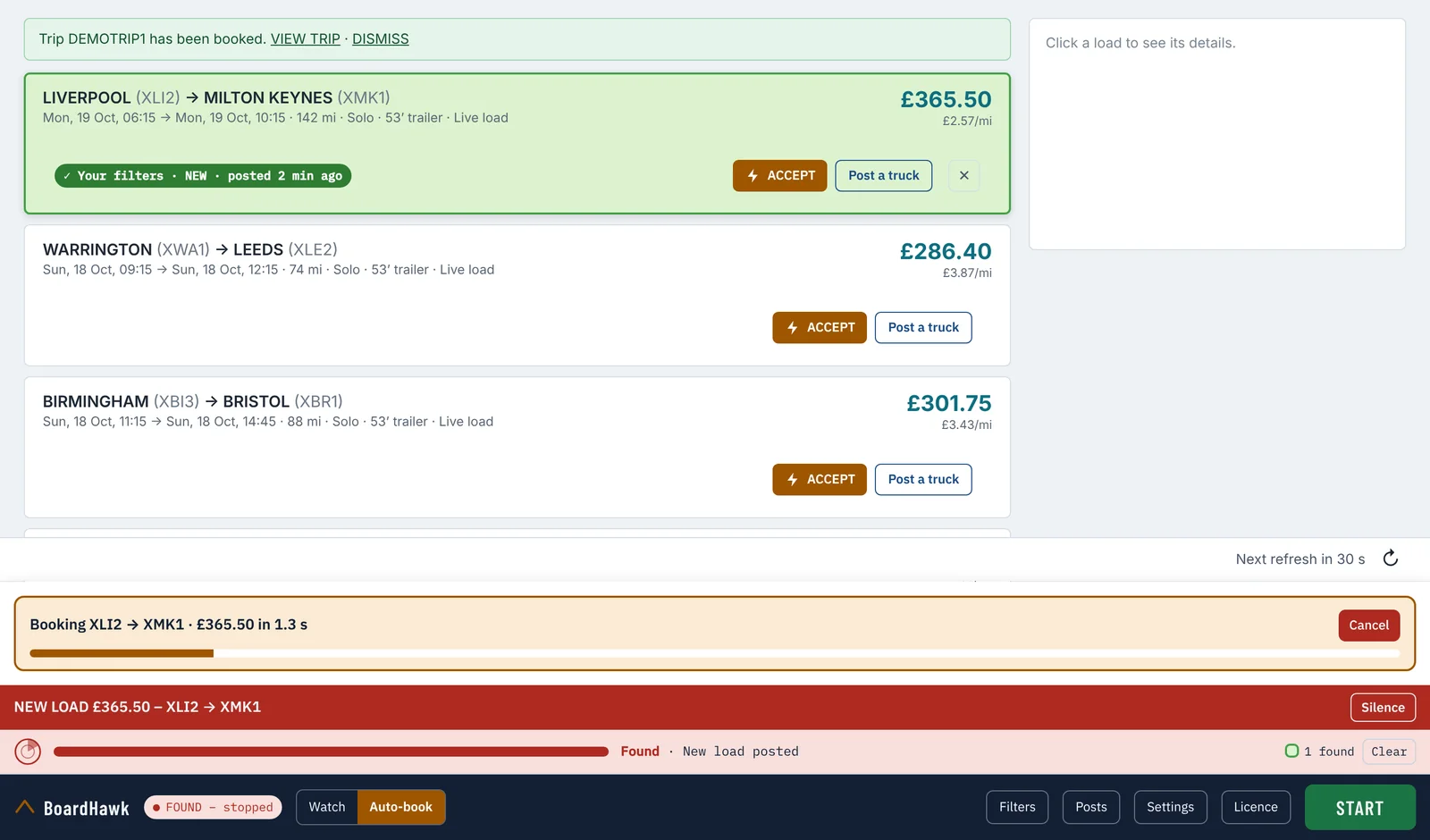
- ACCEPT sits on every card. Press it and the load is booked on your Relay account.
- Auto-book books a load that matches your filters on its own, 1 to 3 seconds after Relay has shown the load's card – you choose. A countdown with a Cancel button shows while it waits.
- One load at a time: it books one, then stops until you press START again. If several turn up together, the best-paid goes first.
- It never auto-books while Relay is slowing it down, and never books the same load twice.
One real booking switches on Instant Book
Before your first booking, ACCEPT simply presses Relay's own Book and confirm buttons for you. When Relay books that load, BoardHawk keeps a copy of the exact booking request Relay's page sent, with your account's own details. From then on ACCEPT books directly in one step, and auto-book can be switched on. So: book one load you really want – with ACCEPT or Relay's Book button – and you're set. Never book a load just to test it.
Post a truck, and keep your posts tidy
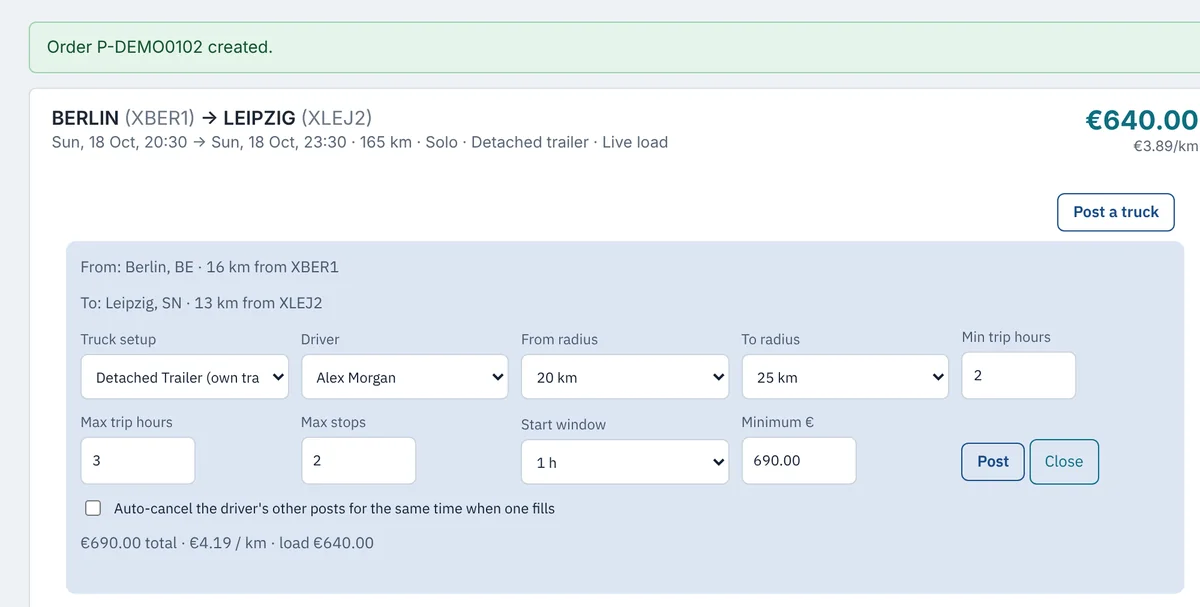
- Post a truck on any card opens a form already filled in from that load – towns, radius, start and end time, stem time (45 min unless you change it), driver and a price you set. Change anything, then post.
- See all your open posts in one list. Cancel the ones you pick, or all of them.
- Repeat a post on other days in one go – every detail copied, only the date moves.
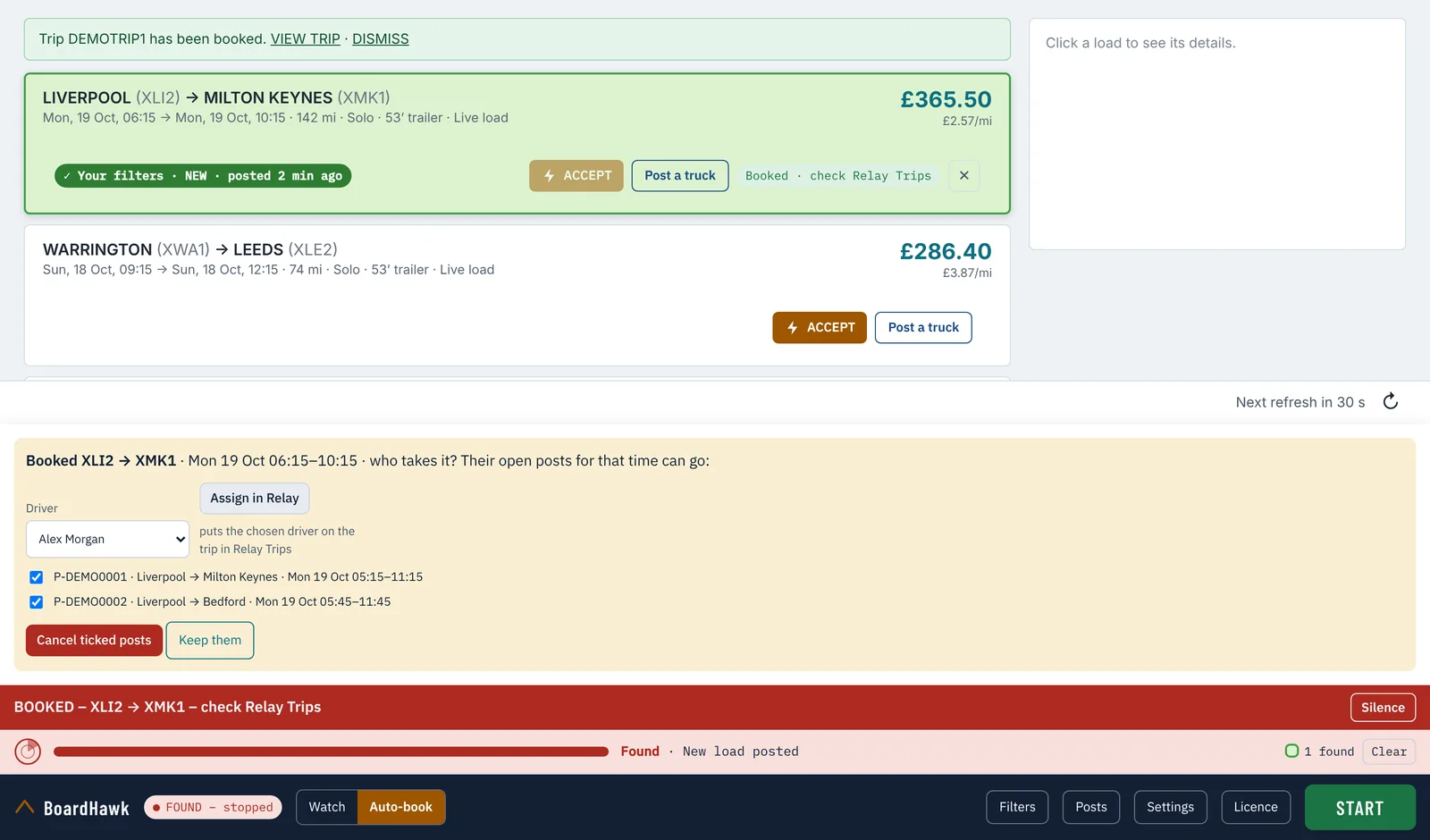
- When a load is booked, BoardHawk can ask which driver takes it, put that driver on the trip in Relay, and cancel their other posts for the same time.
Learns Relay's format – in every country, and again if Relay changes
- Posts, assignments and bookings go out exactly as Relay's own page sends them. BoardHawk learns them from one post, one assignment and one booking of your own on each Relay site.
- Something stopped working after a Relay update? Settings → Learning Relay's format → Learn again, then do it once by hand in Relay. That's it.
- ACCEPT learns Relay's button words too, so it works on boards in other languages.
- Panel size from 60% to 150% (70% to start), a – button to minimise the bar, Check for update with the previous version to go back to, and Export log for support.
Built to behave like a careful person at the keyboard
Stops at every check
Signed out, a sign-in page, a captcha or a bot warning: BoardHawk stops at once and rings. It never tries to get past them.
Relay's own requests
Searches and bookings go out exactly as Relay's page sends them, from your signed-in browser. Nothing is typed in or made up.
Your board stays yours
Loads, prices, drivers and bookings stay in your browser. Our licence server only checks your key – it never sees your board.
You stay in charge
Auto-book is off until you switch it on. Every booking is a real booking on your account, so set your filters with care.
Short videos, one option at a time
Two-minute walkthroughs for YouTube and 30-second versions for TikTok, all on a demo board.
Download BoardHawk
Version 1.0.28 for Google Chrome and Microsoft Edge. Unzip it, load it in your browser (the install guide shows how), open the Relay load board and start your trial from the BoardHawk box.
Download BoardHawk (.zip)Please tick the box above first.
On an Android phone? Get the BoardHawk app – the Relay load board with BoardHawk built in.
Before you download
- BoardHawk is independent software. It is not made by, endorsed by or connected with Amazon.
- Loads booked with ACCEPT or auto-book are real bookings on your Relay account. You're responsible for covering them, and for any cancellation.
- You're responsible for using Amazon Relay within Amazon's own terms and programme policies. Amazon can change its website at any time.
- BoardHawk doesn't promise you'll find or win any load.
- The trial asks for your name and e-mail, kept only to manage your key. See privacy.
One free trial per Relay company account. After the trial, buy a licence key: e-mail [email protected] – the same address for support.
Quick answers
Is BoardHawk made by Amazon?
No. BoardHawk is independent software that works on the Amazon Relay load board in your own browser. It isn't made by, endorsed by or connected with Amazon.
Which browsers does it work in?
Google Chrome and Microsoft Edge on a computer. It runs on the Relay load board while that page is open – relay.amazon.co.uk, .de, .fr, .es, .it, .pl, .cz, .com and .ca.
Why does Instant Book need one real booking first?
BoardHawk never makes up a booking request. It copies the one Relay's own page sends when you book a load you want – with your account's details – and reuses that shape for the next loads. Until then, ACCEPT just presses Relay's own Book button for you.
Something stopped working after a Relay update. What do I do?
Use learning first: Settings → Learning Relay's format → Learn again on the part that stopped (Post a truck, Assign in Relay, or ACCEPT & Instant Book, which covers auto-book too), then do it once by hand in Relay. Still stuck? Settings → Version → Export log, and send us the file.
Which countries does it work in?
Relay's load boards in the UK, Germany, France, Spain, Italy, Poland, Czechia (and the rest of Relay's EU network), the US and Canada – prices in your currency, distances in miles or kilometres as Relay shows them. BoardHawk learns Relay's exact request format once per site from your own first booking, post and driver assignment, and learns again by itself if Relay changes after an update. Only need Post a truck? There's the BoardHawk Post Helper – its own download, key and free trial.
What happens after the 7-day trial?
The refresher switches off and your settings are kept. To keep using BoardHawk, buy a licence key: write to [email protected] – also for support, or to ask for more trial time.